Shakibul Hasan – Google Ads Expert
Free JPEG to Text Converter Online (Unlimited Image to Text Converter)
Easily convert JPEG to text online for free. Our fast and accurate OCR tool lets you extract text from JPEG images in seconds
with no limits, no signup, and 100% free forever.

Upload, Paste or Drag Your Image
Supports: JPG, PNG, WEBP, GIF or Paste from Clipboard
Why Use Our JPEG to Text Converter?
Do you need a quick and reliable way to extract text from JPEG, PNG, or scanned images? Our Free Online JPEG to Text Converter makes it effortless to convert images, screenshots, or scanned documents into editable text instantly.
With just a few clicks, you can copy the text directly or download it as Word, PDF, or TXT. This tool is 100% free, fast, and secure, allowing you to extract text from any image without installing any software or signing up.
Whether you are a student, professional, or business user, our converter works with printed and handwritten text, making it perfect for office documents, assignments, or any text extraction needs. Experience the easiest way to turn your images into editable text in seconds!
Why Use Our JPEG to Text Converter?
- 100% Free & Unlimited
- Works with JPG, PNG, GIF, WEBP, and PDF
- Extracts text from scanned JPEG files
- Fast and accurate OCR technology
- Copy or download text instantly
Why Use Our Image to Text Converter ?
- 100% Free & Unlimited
- Works with JPG, PNG, GIF, WEBP, and PDF
- Extracts text from scanned JPEG files
- Fast and accurate OCR technology
- Copy or download text instantly
Features of Our OCR Tool
With our converter, you can turn scanned JPEG images, documents, notes, or screenshots into editable and searchable text instantly. Perfect for students, professionals, and businesses.
How to Convert JPEG to Text?
- Upload or paste your JPEG file
Click on “Extract Text”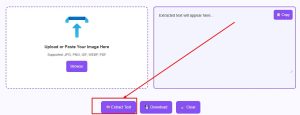
Wait a few seconds for OCR processing
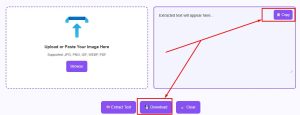
Copy or download your extracted text
Supported Formats
Along with JPEG to text conversion, our tool also supports PNG, GIF, WEBP, and PDF to text conversion.
Unlimited Free Picture to Text Converter
Unlike other tools, we don’t set limits. You can convert unlimited JPEG files to text online – completely free and without registration.
FAQ
Q1: What is a JPEG to OCR Text Converter?
A: A JPEG to OCR Text Converter is a free online tool that extracts and converts text from JPEG, PNG, or image files into editable and searchable text formats.
Q2: Is this JPEG OCR Converter free to use?
A: Yes! Our JPEG to Text Converter is 100% free, unlimited, and requires no registration.
Q3: Can I convert multiple JPEG files to text online?
A: Yes, you can convert unlimited images to text instantly without any restrictions.
Q4: Which image formats are supported?
A: Our OCR tool supports JPEG, PNG, GIF, WEBP, PDF, and more for fast and accurate text extraction.
Q5: Does this JPEG to Text tool work on mobile devices?
A: Yes, the image to text converter works smoothly on desktop and mobile devices, so you can extract text from images anywhere.
Q6: How long does it take to convert a JPEG to text?
A: Conversion is almost instant. Most images are processed within a few seconds using our photo to text OCR tool.
Q7: Can this tool extract handwritten text from images?
A: Yes, our OCR image to text converter supports both printed and handwritten text for accurate results.
Q8: Can I download the extracted text in different formats?
A: Absolutely! Download the extracted text as Word, PDF, or TXT using our image text to text converter.
Q9: Is there a file size limit for images?
A: We support images up to 10 MB, so you can use this free online OCR for large files too.
Q10: Can I use this converter without creating an account?
A: Yes, our picture to text converter online is free and instant, no sign-up needed.
Q11: Can I extract text from scanned PDFs?
A: Yes, the PDF to text OCR feature allows you to convert scanned PDFs into editable text.
Q12: Is my uploaded image secure?
A: Yes! Our image OCR online is safe—images are not stored on the server.
Q13: Can I convert multiple images at once?
A: Yes, use our batch image to text converter to process multiple files simultaneously.
Q14: Which languages does this OCR tool support?
A: It supports multiple languages including English, Arabic, Dutch, Italian, Malay, and more.
Q15: Does image quality affect text extraction accuracy?
A: Yes, high-quality images provide better results, but our photo to text converter free can handle slightly blurred images.
Q16: Can I edit the text after extraction?
A: Yes, after using the image to text free converter, you can copy, edit, or format the extracted text.
Q17: Can this tool recognize tables or structured text?
A: Yes, our picture text reader can detect tables, lists, and other structured text.
Q18: Can I convert screenshots to text?
A: Absolutely! Our screenshot to text converter works instantly.
Q19: Are there any hidden fees or limitations?
A: No, the image to text converter online is completely free and unlimited.
Q20: Does it work on all devices and browsers?
A: Yes! Our photo to text converter online works on desktop, tablet, and mobile, with Chrome, Firefox, Safari, and Edge.